
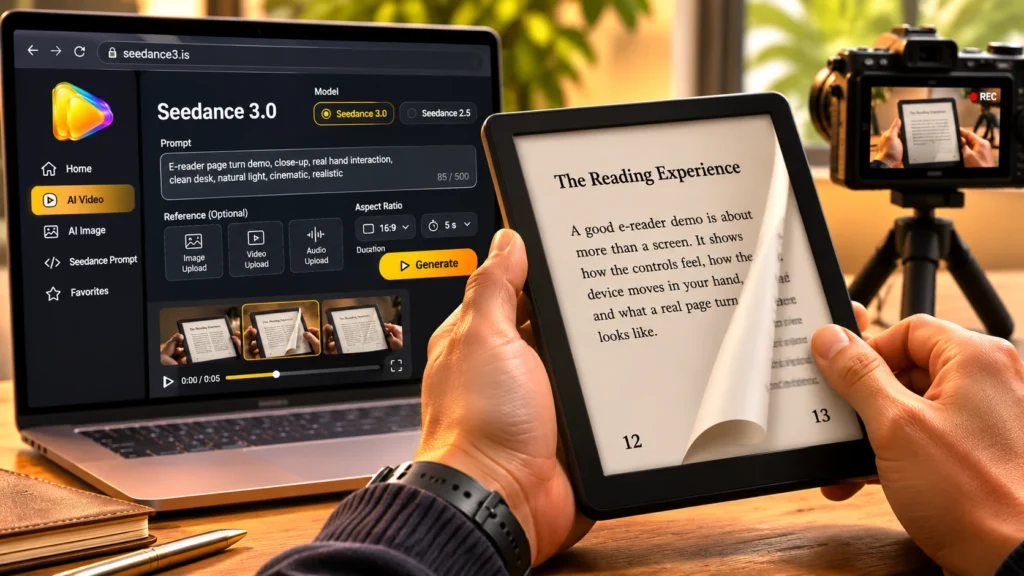
My test shot for an e-reader video starts when a thumb reaches for the right edge of the screen. A page turns and a hand stays still for just long enough to see how the display settles. That small interval is more interesting to me than a montage of books opening. The viewer of a gadget demo can already see from a photograph that a device has a screen. I want to show where the controls fall when someone is actually holding it and what there is to look at during one interaction.
I plan to use a quiet desk, a light from one side and a short document I can show on camera. The document can be a few paragraphs I wrote myself with a large page number, so viewers recognize the change without needing to read the text. I take an overhead photo of the hand position, record a real page turn from the side, and capture the soft sound of the device touching the desk. If the demonstration is about a particular model, the real footage matters more than any illustration of the screen.
Make the thumb and the page share a frame
A portfolio of beautiful product shots can conceal a frustrating editing problem: the control sits at the edge of the crop. I can open the desk photo in seedance 3.0 for an image-to-video framing test. My written brief keeps the screen at the center and asks a hand to make one motion from the edge of the device toward the control. I stop the test there. That tells me whether there is room to show the reach while preserving a legible view of the screen. For the public demo I can film the actual page turn in the angle that makes both elements visible.
The side recording is useful for a different reason. It shows that the reader tips a little when someone changes their grip. In a reference-to-video test with seedance 3.0 I can combine the motion clip, the overhead still and a line describing the direction in which the device tips. I plan to compare two variants: one in which the camera sees the fingernail just before the touch, and one in which the finger enters from the bottom of the picture. If the first variant hides the lower corner of the screen, I know how to change the angle before reshooting the real device.
Keep the screen behavior out of the illustration
Generated footage can make the device seem responsive in a way that misrepresents its actual behavior. A page can slide smoothly even when the device refreshes in a different pattern. The one interaction a prospective owner wants to see is exactly the one I should keep from the real demonstration. A study from seedance 3.0 helps me position the camera, but I plan to use an unbroken live clip from touch to the completed refresh when showing response. I can reserve illustrated material for an opening angle or a behind-the-scenes shot about how I made the video.
If the display flickers unexpectedly in the live footage, I will make a fresh take under the same light before I decide whether the effect comes from the device or the camera. The frame needs a reference object, such as the edge of a notebook, so I can tell when the camera moves. A bright reflection can be more distracting than the refresh itself. I can move the light a little, review the two takes together, and choose the one where the viewer can follow the page number. In the narration I can say how the camera was positioned and leave model-specific claims to the observed footage.
Use one small sound to move between setups
The sound of setting the device down gives me a bridge to a scene where both hands are free. I record it once on the desk and once on the mat, then listen for which version matches the visible surface. Including that recording alongside a photo, the side clip and a written brief in seedance 3.0 lets me explore a reference-led cut in which the device lands and the camera looks down. In the actual edit I can use the original tap and keep it slightly ahead of the cut if the change of perspective otherwise feels abrupt.
I also want a mute version in which the viewer can follow the interaction from picture alone. A short caption can name the action before the thumb reaches the edge. I plan to take it off when the page changes and hold the screen for a moment afterwards. If I put the words over the device, the caption could cover the page number that makes the action readable. The text can sit on the desk area below the hand in the wider cut. For the vertical version I can leave the extra area on the other side of the frame or put the caption between shots.
Finish with a cover that matches the actual video
A text-to-video composition test in seedance 3.0 can help me see whether a wider angle leaves room for the cover text. I can describe a device angled toward the window, a notebook at the edge, and an unobstructed hand. When I shoot the real thumbnail, I will use the same document I showed in the clip. A person who pauses on that cover should see the same device and page once they press play. If the study suggests a sharper-looking angle that instead throws a bright reflection onto the live screen, it has served as a useful comparison and can stay in the notes.
I will deliver a close version for the review and a short vertical cut for viewers who want to see one interaction quickly. I identify any visual studies from seedance 3.0 where they appear and keep a copy of the uncut page turn alongside the edit. The result should answer a small question clearly: how does a page turn look when a person holds that reader at their normal angle? That is a concrete reason to spend a few seconds watching a device that otherwise looks much the same in every still photograph.