
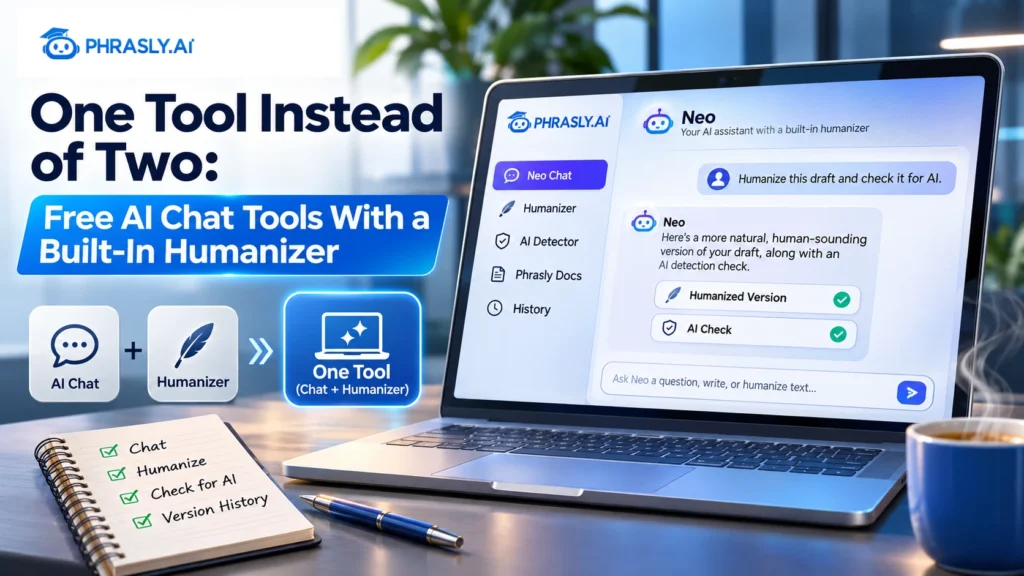
Copy. New tab. Paste into the humanizer. Wait. Copy the result, go back to the chat, and paste again. Then notice the rewrite dropped your client’s name, and do the whole loop a second time.
If that sounds familiar, you’re paying a small tax every time you write with AI. Researchers who tracked 137 workers across three Fortune 500 companies found the average person toggled between apps and websites nearly 1,200 times a day, losing a little over two seconds to reorient after each switch (Harvard Business Review, 2022). That added up to just under four hours a week.
A humanizer in a separate tab is only one of those switches. But it sits right in the middle of your writing, where focus matters most. So this guide looks at a simpler setup: a free AI chat tool where the humanizer is already in the room. What to look for, what “free” really covers, and how to use one without letting it think for you.
The Copy-Paste Relay Costs More Than It Looks
Two seconds sounds like nothing. The trouble is what happens around them.
In the same HBR study, users jumped to yet another app less than 11 seconds after 65% of their switches. Attention never settled. People arrived, half-read, and left again.
Writing with two AI tools works the same way. You draft in a chatbot, carry the text to a humanizer, then carry it back to fix whatever the rewrite broke. Every trip strips away context. The humanizer has no idea the email is for a nervous client, and the chatbot has no idea what the humanizer changed. You become the glue between them. Glue work is tiring.
Why Most Writers End Up With a Stack of AI Tools
Nobody plans a five-tab writing process. It just piles up.
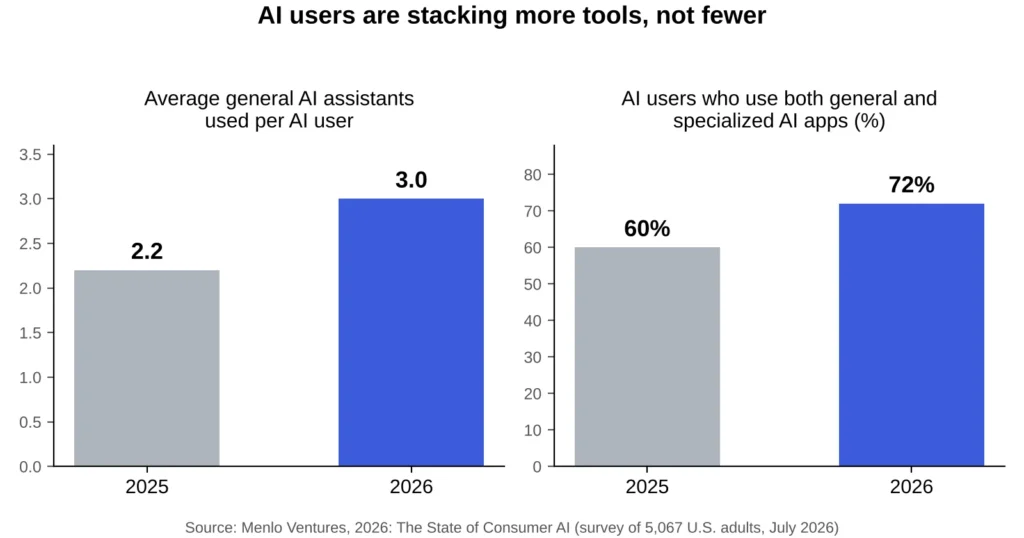
Menlo Ventures’ 2026 State of Consumer AI report, based on a July 2026 survey of 5,067 U.S. adults, found the average AI user now relies on 3.0 general assistants, up from 2.2 a year earlier. The share using both a general assistant and a specialized AI app climbed from 60% to 72%.
Writing is where the stacking shows most. The same report found 61% of people who look for writing support now use AI to get it, the highest share of any activity Menlo measured. Readers are getting pickier at the same time: 36% of Americans said they’d be less likely to engage with content they knew was AI-generated, compared with 14% who’d be more interested.
That gap is why humanizers exist. It’s also why bolting one on as a separate step feels so clumsy.
What a Built-In Humanizer Should Actually Do
Plenty of chatbots will “make it sound more human” if you ask. That’s a style request, and the result often swaps one set of tells for another.
A built-in humanizer is different. It’s a dedicated rewriting model the chat can call on your draft inside the same thread, so your notes, the draft and the rewrite stay together. You can say “the second paragraph lost the deadline, put it back,” and the tool knows exactly what you mean.
Five Checks Before You Trust One
- Same thread, start to finish. If you still paste text into another box, it isn’t really built in.
- Version history. You should be able to compare the rewrite with your original and roll back.
- A detector nearby, framed honestly. A score is a rough signal. Any tool promising a guaranteed pass is overselling.
- Clear free limits. A free plan should say what it covers in words or uses, not spring a paywall at the last step.
- Plain answers about your data. Find out what’s stored, where, and for how long.
How Phrasly Neo Keeps Chat and Humanizing in One Place
We’ll be upfront: Neo is ours. It’s Phrasly’s everyday chat model, and it’s the free AI chat tool with a built-in humanizer we built so people could stop running that tab relay.
You can ask Neo questions, brainstorm, upload a PDF, scan, image or audio file, and have it draft an email or a report. When you want a passage rewritten, you type “humanize this,” and Neo hands it to Phrasly’s humanizer without you leaving the chat. Say “check it for AI” and the detector runs right there too. Longer pieces get written on a page beside the conversation and saved to Phrasly Docs with every version, so your original never disappears.
Two honest notes, both from Phrasly’s own FAQ. Neo doesn’t humanize every reply by default. It’s tuned to write naturally, and the humanizer runs only when you ask. And humanizing doesn’t guarantee any particular detector result. Anyone selling certainty there is guessing.
What the Free Plan Covers, and Where It Stops
The chat itself is free for signed-in users on every plan, with daily limits. The humanizer and detector follow your account’s plan. Here’s the split as listed on Phrasly’s site in November 2026:
| Feature | Free account | Paid plan or trial |
|---|---|---|
| Neo chat | Yes, with daily limits | Yes, with plan limits |
| Humanizer words | 300, one time | 1,000 on the $2 three-day trial, unlimited on Unlimited |
| Humanizer model | Standard Phrasly Humanizer | Phrasly Ultra |
| Web search and image creation | Not included | Included |
| Full documents in Neo | Up to 500 words each | Uses your plan’s generations |
So the free tier is enough to judge whether the rewrites fit your voice. It isn’t built to run a content calendar. If the fit is right, Phrasly Ultra is the paid model, with five rewrite modes for different levels of change.
A One-Chat Routine You Can Use Tomorrow
Having both tools in one place only helps if you use them in the right order. Here’s the sequence we’d suggest:
- Give context first. Paste your notes or upload the file, then say who it’s for and what it needs to achieve.
- Fix the substance in chat. Challenge weak claims and missing points before anything gets humanized. A rewrite can’t rescue a bad argument.
- List what can’t change. Names, numbers, dates, the call to action. Write them down.
- Humanize once. Compare the result against your list and restore anything the rewrite touched.
- Read it out loud. Cut every line you wouldn’t actually say.
Step three matters more than it looks. When our team tested humanizing Claude-drafted outreach, the rewrites kept every name and date but reworded each call to action. That’s why our guide to humanize AI cold emails ends with a fixed-lines check. If several people write for one brand, the same habit slots into a wider brand voice editing process.
Human review isn’t optional, and most professionals already know it. In Ahrefs’ 2026 survey of 301 marketers, 66% said they trust AI-generated content only after a person reviews it, and just 2.7% trust it with no review at all. One more detail stood out: 29% now use AI to check their AI content, up from 14% a year earlier. A detector in the same chat makes that check quick. It shouldn’t replace your own read.
When Running Two Tools Still Makes Sense
One chat won’t suit everyone. If your team already lives in Claude or ChatGPT, moving to a new chat app may cost more than it saves. A connector can bring the humanizer to you instead. Phrasly’s MCP server does that with three narrow tools: humanize, detect and account status. Still, check any connector’s permissions before you click Connect. Our guide to MCP security walks through a five-minute check.
High-stakes writing is the other exception. Legal copy, crisis statements and anything a compliance team signs off should have a human editor leading, whatever tools sit underneath.
Fewer Tabs, Better Drafts
The case for one tool instead of two isn’t really about saving clicks. It’s about keeping the draft, the context and your judgment in the same place long enough to make the writing good.
Pick a chat tool where the humanizer runs on request inside the thread, where versions are saved, and where the free plan is honest about its limits. Test it on something you’ve written before, so you can tell whether it still sounds like you. Then keep the habit that matters most: lock what can’t change, humanize once, and read the result yourself before anyone else does.
Your attention already gets split nearly 1,200 ways a day. Your writing process doesn’t need to add to it.