

Overview
I often watch videos on YouTube TV, and now I want to download some of them to watch offline. I checked YouTube website and it said that in order to download them, first I needed to buy them. Is there another method to download videos from YouTube TV?
I plan to travel on a longer flight, so I want to download some TV videos from YouTube TV for offline playback. Is there a method to download as many YouTube TV videos as I want?
Well, YouTube TV is full of many excellent TV videos and if you buy or rent some TV videos from YouTube TV you can download them on your iOS or Android devices and watch them on your YouTube app. This method is not convenient and will cost much to download many YouTube TV videos and so how to download YouTube TV videos easily and in a money-saving way? A professional YouTube TV Downloader – Allavsoft can easily help you with that.
Key Features of Allavsoft
Easily download any YouTube TV video file in any genre and save it as any output format, like MP4, MKV, AVI, FLV, MOV, WMV, etc, for you to easily download any YouTube TV video compatibly.
There will be no quality loss when you use this downloader to download YouTube TV videos.
The super high downloading speed is provided to download many YouTube TV videos.
Besides YouTube TV videos, it also helps to download many other online videos from Vimeo, Facebook, Dailymotion, TikTok, and total 10,000+ video websites.
There will be no ad and no virus and no plug-in during the YouTube TV video download process.
It also has the batch download function to batch download many YouTube TV videos or many other video files at one time.
Guide on Downloading Shows From YouTube TV
You can follow the guide below to easily download any show from YouTube TV.
Make Preparation: Free Download the Professional YouTube TV Downloader – Allavsoft
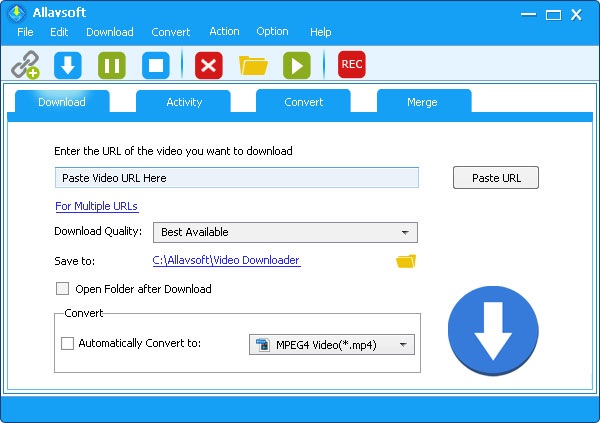
Free download the professional YouTube TV Downloader- Allavsoft (for Windows, for Mac), install and then launch it, the following interface will pop up.
Step 1: Import the YouTube TV Video URL
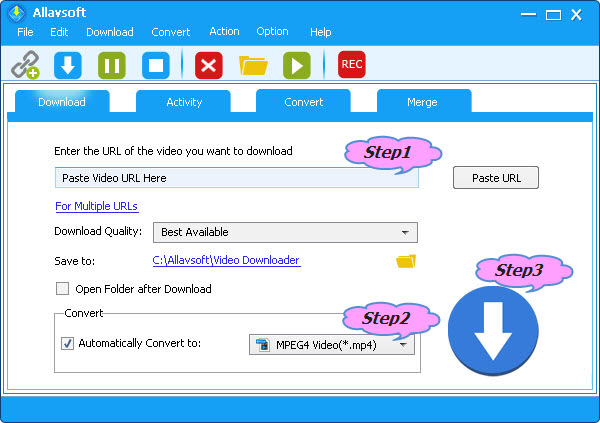
When you find your needed YouTube TV video, just copy its video URL and paste it to this downloader URL box. You can also drag and drop the YouTube TV video URL to this downloader. If you want to batch download many YouTube TV videos you can use the batch download function to download all of them at once.
Step 2: Set MP4 as the Output Format
The MP4, MOV, WMV, AVCHD, RMVB or other output formats can be easily set by clicking the Profile button > “General Video” category/”HD Video” category.
Step 3: Start to Download YouTube TV Video Files as MP4, MKV, AVCHD, etc
The last step is to click the Download button to get your imported YouTube TV videos as your needed MP4, MKV, AVCHD, etc.