
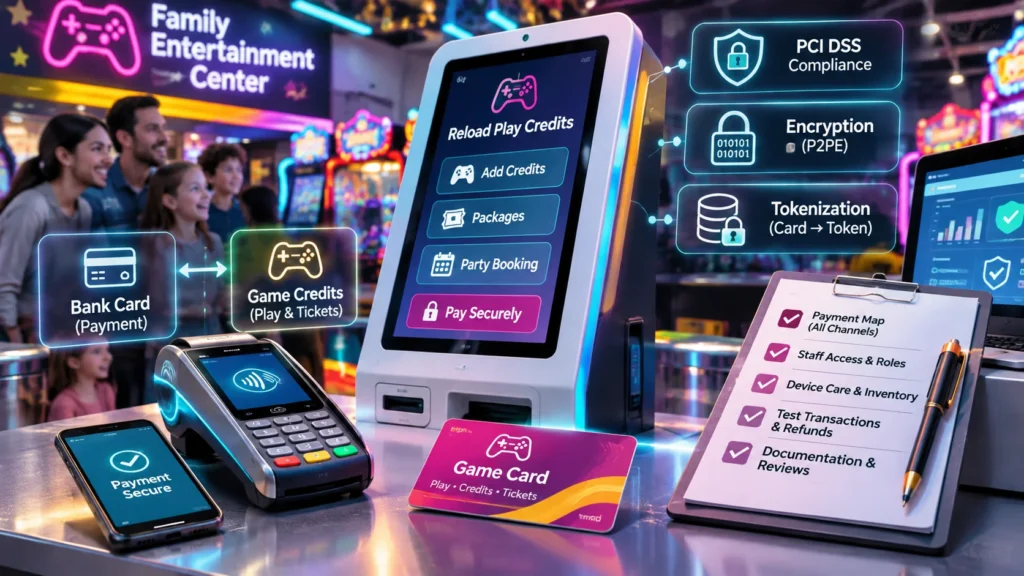
A family entertainment center may accept payments at a front desk, a self-service kiosk, and an online party-booking page before its first weekend is over. For a new operator, understanding how those channels connect is a useful starting point for payment security. The goal is a clear picture of the equipment, information, and people involved in each transaction.
That picture does not need to begin with technical diagrams. Start with what a guest does, identify the systems that support it, and ask providers to explain the handoffs. Familiar terms become much easier to understand when they describe an actual sale or reload at the venue.
Separate game credits from bank-card information
An arcade game card and a bank card do different jobs. The game card identifies a guest’s play account, which may include credits, tickets, or package entitlements. A bank card supplies a way to pay for those credits. Keeping those roles distinct makes conversations with payment and arcade-system providers more productive.
For example, a guest might buy play credits at a kiosk and use them at several games. The games need to recognize the play account and deduct the appropriate credits. They do not need to repeat the original bank-card transaction each time the guest starts a game.
Draw these as two connected workflows: purchasing value and using that value. Include ticket redemption in the second workflow where applicable. This helps staff understand why a question about a missing game credit may go to a different support team than a question about a bank-card payment.
The distinction also helps with reporting. A game-credit balance, a sales receipt, and a processor settlement report describe different parts of the visit. Ask the provider to demonstrate how staff connect those records when answering a guest’s question.
Map every place a guest can pay
Make a list of payment channels before discussing individual devices. A small venue might have a staffed counter and one reload kiosk. A larger center might also offer online top-ups, party deposits, and portable terminals for floor staff.
For each channel, record the guest’s starting point, the device or web page they use, and the system that confirms the purchase. Then ask the provider where bank-card information enters the process and which systems receive it. A simple table with one row per channel is often enough for the first meeting.
A phone can participate in several different flows. Tapping a phone at a payment terminal is different from entering bank-card details in a phone browser. Adding a virtual game card to a phone wallet is another task again. Describe the actual action rather than using “mobile payment” as a catchall.
Include refunds and canceled transactions in the map. Ask which screen staff use, who can authorize the action, and what confirmation appears afterward. These everyday workflows deserve as much attention as the initial sale because they are the ones staff must explain clearly under pressure.
Learn the vocabulary that matters
PCI DSS stands for Payment Card Industry Data Security Standard. It is a framework used in discussions about protecting payment-card information. New operators will encounter the term in conversations with payment providers and their acquiring bank, the organization supporting their card-acceptance relationship.
Another useful term is the cardholder data environment. In broad terms, this refers to the people, processes, and systems involved in handling cardholder data. Ask a provider to relate that definition to the venue’s payment map rather than simply handing over a diagram full of acronyms.
“Merchant of record” identifies the entity associated with the sale and payment relationship. Confirm how that role is arranged for each channel, particularly where an outside booking or ticketing service participates. The agreement and the provider’s explanation should describe the same arrangement.
Operators do not need to memorize the entire payments vocabulary. A short shared glossary can be more useful. Write down the terms that appear in the proposed setup, what they mean in plain English, and which contact can answer follow-up questions about them.
Understand encryption and tokenization
Encryption transforms information so it is unreadable without the appropriate means to decrypt it. In a payment discussion, ask where encryption begins, where it ends, and who manages those parts of the system. A provider should be able to explain the route without expecting the operator to become a cryptography specialist.
Point-to-point encryption is a term used for payment solutions that encrypt card data at the point of interaction and decrypt it at the designated endpoint. Ask which solution the proposal includes and how its installation and device-management procedures work at the venue.
Tokenization is a different concept. It replaces a bank-card number with a surrogate value called a token. The token is not the guest’s game-credit balance, and it should not be confused with the identifier printed on an arcade card. Those records serve different purposes even when they appear in connected software.
The PCI Security Standards Council describes tokenization as substituting a token for the primary account number. Use that distinction to guide the demonstration: ask the provider to show which references appear on receipts, in staff reports, and in payment records. This makes an abstract technical feature easier to understand in daily operations.
Make provider conversations specific
A productive provider meeting starts with the venue’s own payment map. Walk through a counter purchase, kiosk reload, online booking, and refund. For each, ask what the guest sees, what staff see, and where a manager finds the transaction afterward.
Background reading on PCI compliance payment systems can help operators prepare the vocabulary for those conversations. Keep the meeting focused on the proposed arrangement, the available documentation, and the responsibilities assigned to each organization.
Useful questions include:
- Which payment-processing service supports each sales channel?
- What documentation describes the payment solution and its deployment?
- Which installation and maintenance tasks belong to the provider?
- Who manages staff accounts, permissions, and device records?
- Which contact handles a transaction question, a device issue, or a reporting problem?
Record the answers in one place. A concise responsibility sheet is easier to use during a busy shift than scattered emails. Have the relevant teams review that sheet before opening so everyone shares the same understanding.
Give staff access that matches their jobs
Cashiers, party hosts, supervisors, and managers perform different tasks. A cashier may need to sell packages and review recent transactions. A supervisor may also handle refunds. A manager may configure offers or export reports. Discuss these roles during system setup rather than leaving every employee with the same access.
Ask for a demonstration of individual staff logins and available permission settings. Build training around the screens each role actually uses. A short exercise in finding a receipt and escalating a refund request can teach more than a broad tour of every menu.
Include account changes in routine personnel administration. Someone should own the process for adding a new employee, changing a role, and closing access when employment ends. Keep the instructions accessible to the managers responsible for those tasks.
Provider support access deserves a defined process too. Ask how a support session is requested, authorized, and closed. Staff should know how to recognize an expected support interaction and which internal contact coordinates it.
Make device care part of opening routines
Keep an inventory of payment devices with their locations, identifying details, and support contacts. A labeled floor plan can help a new supervisor locate the correct terminal when a support representative asks which device needs attention.
Ask the installer to demonstrate the normal appearance of each terminal, its mounting, and its cable connections. Staff can then include a brief visual check in the opening routine and report unexpected changes through the agreed process. Let the payment provider define the appropriate next steps for its equipment.
Coordinate device maintenance with venue operations. A scheduled update is easier to manage when staff know which register is involved, how long the work is expected to take, and who confirms completion. Record replacements so the inventory continues to match the floor.
Also ask the technical team to explain how payment equipment connects to the venue network and how guest Wi-Fi is arranged. Keep that explanation with the installation documents so later changes can be discussed using the same reference.
Rehearse the complete transaction before launch
A payment demonstration should continue beyond the moment a terminal accepts a card. Check that the intended game credits, package, or booking appears in the correct place. Then find the receipt and the corresponding management record.
Use the provider’s testing process to rehearse unsuccessful and interrupted transactions as well. Staff need to recognize the messages they may see and know where to look for transaction status. Agree on a clear escalation route for cases that need support rather than asking each shift to improvise.
Practice a refund or correction through the approved workflow. Include a manager who will supervise those tasks after opening. Write the resulting steps in plain language, using the screen names employees will see during a real shift.
Finish with a handoff exercise: a guest asks about a purchase, a cashier locates the record, and a supervisor contacts the right support team if needed. That rehearsal connects payment technology to the service experience.
Keep documents and responsibilities current
Create one folder for payment agreements, installation records, device inventories, responsibility sheets, and support details. Ask the acquiring bank or payment provider which assessment documents and review dates belong on the venue’s calendar. Record the specific dates supplied for the arrangement rather than assuming every venue follows an identical schedule.
Revisit the payment map when adding a kiosk, launching online top-ups, or opening another location. A short change review helps identify new devices, training needs, and contacts before those additions become part of a weekend shift.
The most useful starting point is clarity: know what each system does, where payment information goes, and who handles each task. With those basics documented and practiced, a first-time operator can discuss payment security confidently and give staff a process they can actually follow.