
Even in the current cloud system, the requirement for offline editing of documents is still in great demand. There may be instances where internet connectivity is not readily available, and it may not be safe to upload confidential documents to the internet. Whether it is official documents, academic documents, or professional reports, the requirement to convert PDF files and edit Word documents offline is a huge advantage.
The fact is that the offline software available today enables you to convert, edit, and manage PDF files and Word documents without internet access. In this article, you will discover the significance of offline document management and the connection between PDF files and Word documents.
Why Offline Document Editing Still Matters
Online software may be very handy, but there are also some drawbacks. For example, if you upload files to online software, you are dependent on third-party servers for your files. This may be a drawback if you are working on important files.
The advantages of offline document editing are:
- Better Privacy: Your files stay on your computer.
- No Internet Needed: You can work anywhere, anytime without the need of a internet connection.
- Works Faster: No need to wait for uploads and downloads.
- Better Control: You can use advanced editing tools.
- Budget Friendly: No online subscription charges.
Due to the benefits, offline software is in high demand among students, professionals, writers, and institutions that handle documents on a regular basis.
Understanding PDFs and Word Documents
In order to understand why converting PDFs to Word documents could be important, let us first take a look at how PDF documents and Word Processing documents vary.
What is Special About PDFs?
PDF files are created in a way that they are fixed files. They retain their formatting. Fonts, layouts, graphics, and spaces are all works on any platform. While PDFs are excellent for sharing and printing, they are non-editable files. Thus, they cannot be used for editing purposes.
Why Word Documents Are Better to Work With
Word documents (DOC and DOCX) are created for editing. They allow editing text, formatting, and collaboration. This is why PDF to Word conversion is the best solution when editing is required.
Offline PDF tools can now make sure that the entire process of conversion and editing is done smoothly without compromising the quality of the formatting.
When You Need PDF to Word Conversion Offline
The offline PDF to Word converter has a wide range of applications in daily life, some of which are as follows:
- Editing scanned copies of notes or study material
- Editing contracts or legal documents
- Editing resumes that have been submitted in PDF format
- Editing reports or research papers
- Editing documents temporarily when internet connectivity is not available
How to Convert PDFs to Word Offline Using Systweak PDF Editor
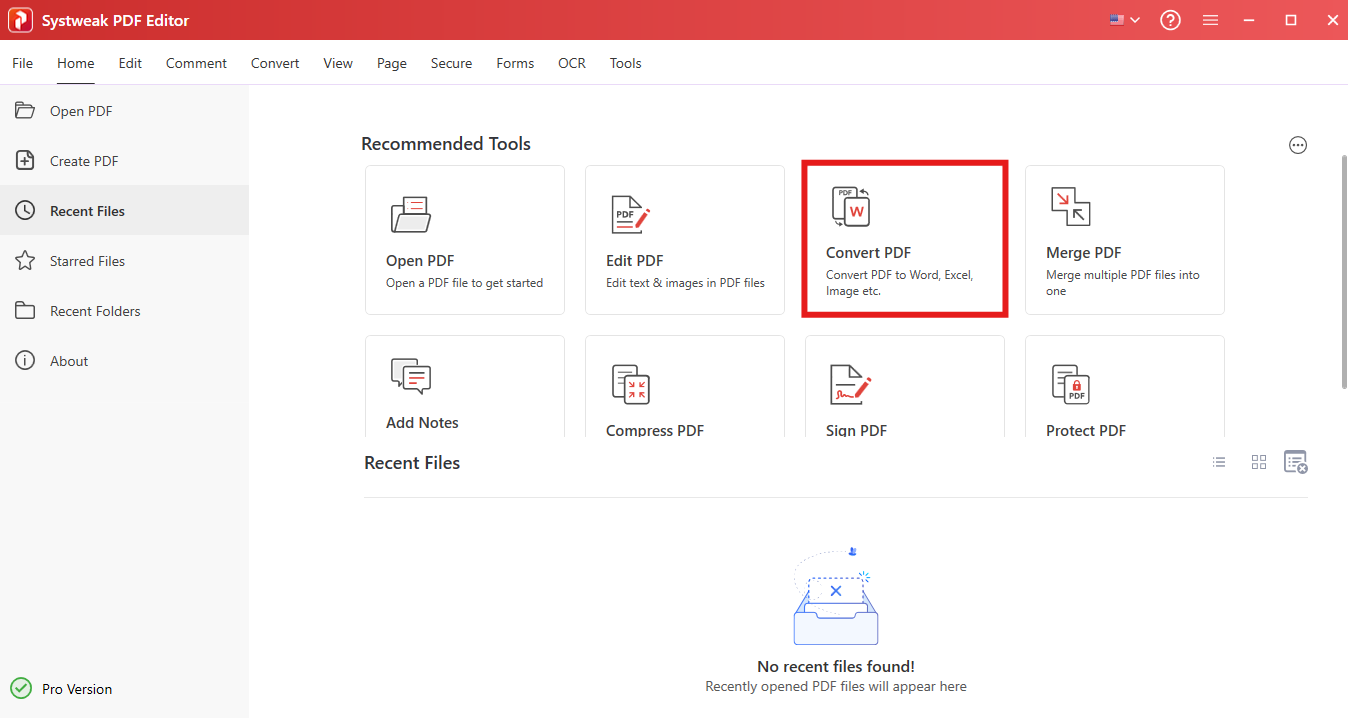
Systweak PDF Editor is an offline application for Windows users to manage PDFs offline. This application enables you to convert PDFs correctly while maintaining security of PDFs on the computer.
Steps to Convert PDF to Word Offline:
- Download and install Systweak PDF Editor.
- Click on Convert PDF.

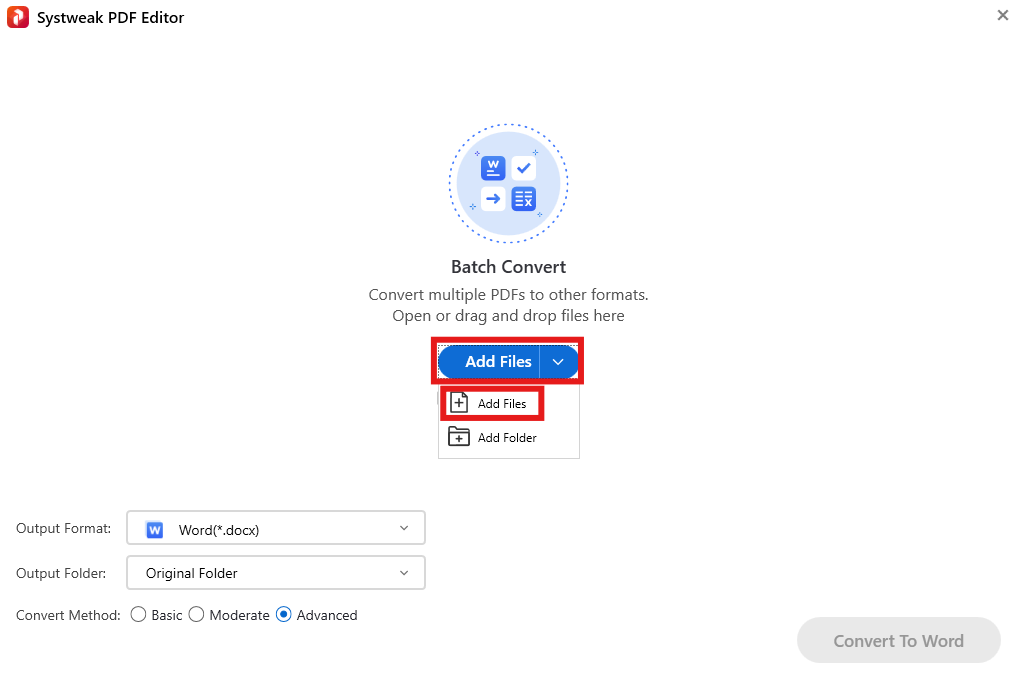
- Click on Add files and select the PDFs you need to convert.

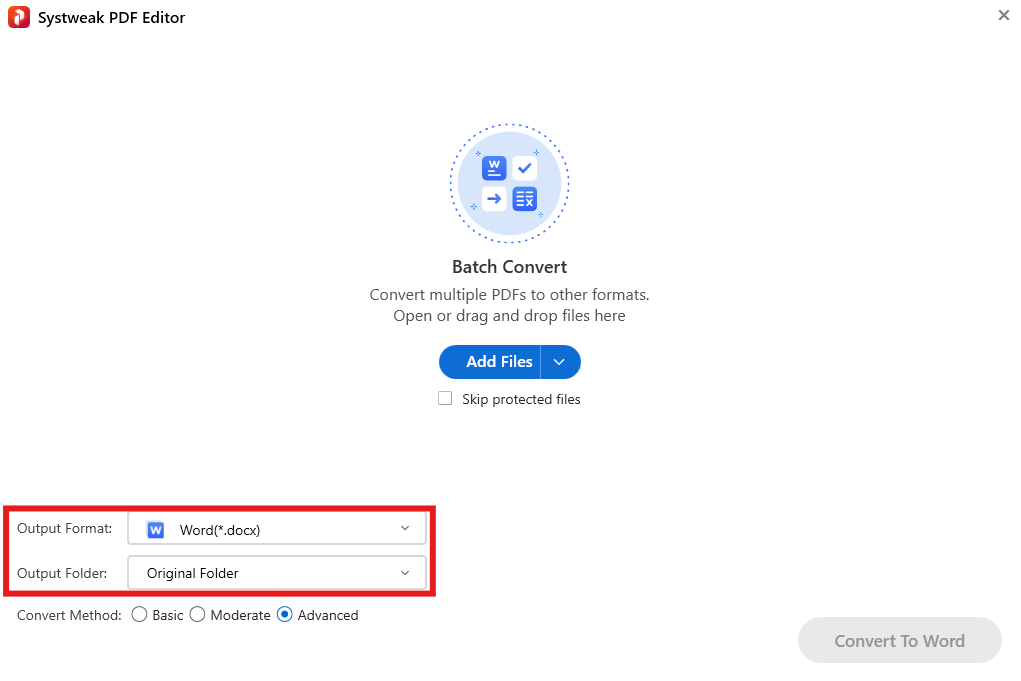
- Choose the Output Format to Word.
- Choose the Output Folder.
- Click Convert to Word.
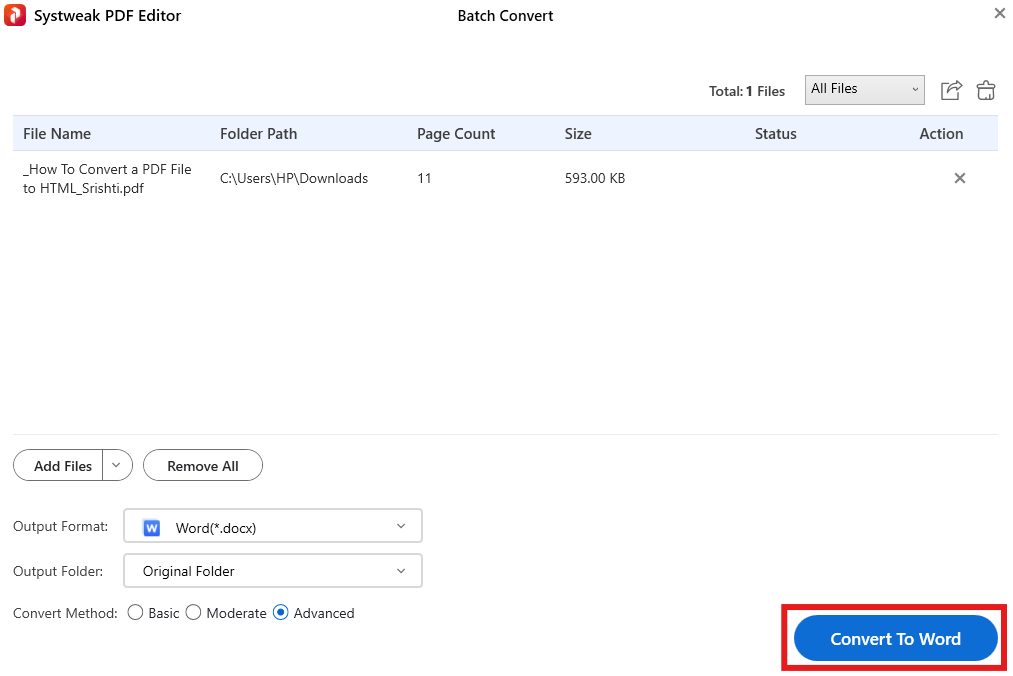
The converted Word file will be similar to the original PDF file, with images included. This file is ready for editing.
Editing Word Documents Offline
Now that you have converted your PDF file to a Word document, you can edit your Word document without needing to be online. This way, you can do so even when you are off-site or in a different location away from your computer but still have access to your document.
You can:
- Edit or change text
- Change fonts, size, and alignment
- Insert images and tables
- Change headers and footers
- Correct formatting or grammatical errors
- Save multiple versions offline
Editing offline is very helpful when you are working on a large document or multiple versions.
Editing PDFs Without Converting Them
If you only have to make a few changes to your PDF file, you might not have to convert it to a Word document. To make minor changes, simply access the PDF file that requires modification.
Using the Systweak PDF Editor software program, you are able to perform all types of editing functions while offline.
- Make changes to the existing text in the PDF file
- Add new text or images
- Highlight or mark the text
- Add comments or notes
- Reorganize or delete pages
This is very helpful while filling out forms, reading documents, or making corrections.
Handling Scanned PDFs Offline with OCR
Scanned PDFs are image files that cannot be edited unless an OCR (Optical Character Recognition) process is used. OCR helps in making the scanned file editable.
Offline OCR can be applied to:
- Old printed documents
- Academic documents and books
- Receipts and invoices
- Legal documents
Systweak PDF Editor has an OCR feature that enables users to edit scanned PDF files as editable Word documents offline without uploading them online.
Other Offline Conversion Options
The offline PDF editors also support other types of conversions apart from Word, such as:
- PDF to Excel
- PDF to PowerPoint
- PDF to image files
- PDF to text or HTML
- Word, Excel, or PPT to PDF
Such capabilities make the offline tools versatile in various document operations.
Why Choose Systweak PDF Editor for Offline Work?
Systweak PDF Editor provides a fantastic combination of ease of use and functionality:
- Offline use after installation
- Ease of use for beginners
- Accuracy in conversion
- Inbuilt OCR functionality
- Secure document management
- Full-featured PDF management solution
This tool is a perfect solution for all your PDF tasks that you need to work on offline with ease.
Best Practices for Offline Document Editing
To ensure that there are minimal errors and that you achieve the best possible outcome, you should follow these guidelines:
- Make copies of original documents
- Employ OCR on scanned documents
- Check formatting after the process
- Organize documents using folders
- Save changes when making significant changes
The above tips will help you in preventing data loss and ensuring accuracy.
Offline vs Online Tools: Quick Comparison
| Features | Offline Tools | Online Tools |
|---|---|---|
| Internet Required | No | Yes |
| Data Security | High | Moderate |
| File Size Limits | None | Often Limited |
| Editing Features | Advanced | Basic |
| Long-Term Costs | One-Time | Subscription Cost |
Conclusion
The aspect of editing Word files and PDFs offline ensures greater privacy, reliability, and control. The aspect of using offline tools ensures that internet connectivity is not required, and at the same time, the advanced features of editing, converting, and OCR are provided.
For those who handle documents on a daily basis, Systweak PDF Editor is a very useful tool. It ensures all document editing and PDF editing needs are met offline in one secure package. The feature of working offline allows you to work with documents easily and feel secure about your information.
FAQs
Q: When converting a PDF into a Word document, is the formatting of the PDF maintained?
A: Most formatting (i.e., text, any images, tables) will remain intact. However, there may be a couple of small adjustments required by you.
Q: Will you need OCR to convert a scanned PDF into a Word document?
A: Yes, you will need OCR to convert a scanned PDF into a Word document.
Q: How secure are offline PDF to Word converters?
A: Yes, since the files are on your computer, offline PDF to Word conversion is a secure process.
Q: Can I edit the Word file after conversion?
A: Yes, after conversion, the Word file can be altered as required.