
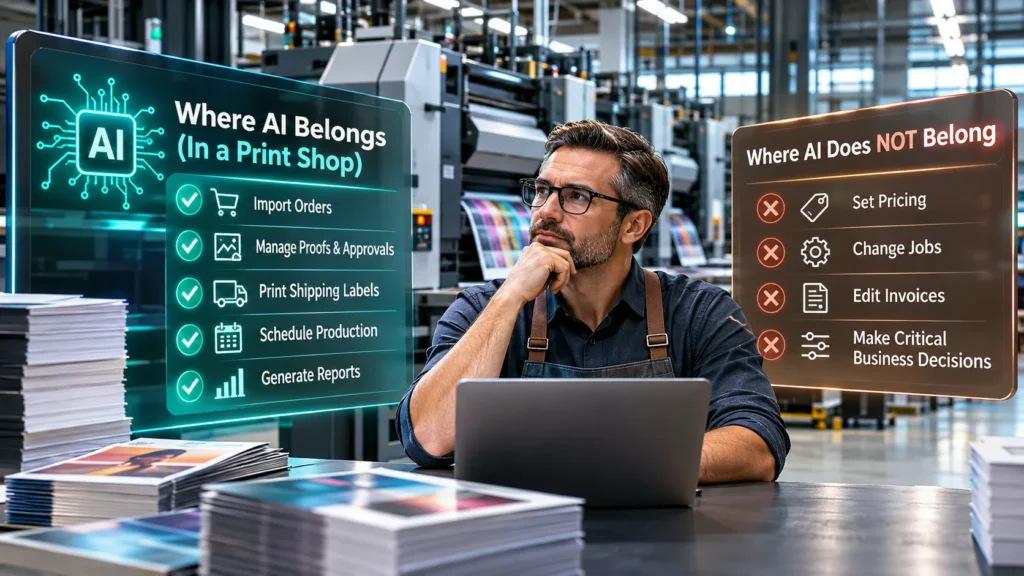
Every piece of business software is adding AI this year. I run a commercial print shop, and I have spent the last two years deciding exactly where AI is allowed to go in mine. Not in theory. In a building with presses that run 15,000 to 20,000 folders a day, where a wrong decision is paper and ink you do not get back.
Here is the line we drew, and why I think it is the right line for any shop that makes physical things. For what it is worth, AI is the reason the system exists at all. Writing a script or scheduling a task with an assistant had become something anyone could do. What nobody had was shop software with an API or a connector good enough for the assistant to use. So we built that first and the rest of the system around it.
The problem with “AI powered”
Most of what gets sold as AI for small business is a chatbot bolted onto a screen. It can answer questions about the software. It cannot see your jobs. Or worse, it is a browser bot that clicks through your screens for you, which means it can click the wrong thing.
Neither of those is what a shop owner wants. What I wanted was to ask “what is due today” and get an answer from the actual schedule. And I wanted the boring repeating work, labels, proof uploads, order imports, to happen without a person, but without any chance of the automation shipping the wrong job.
Rule one. Reading is free. Writing needs a person or a key.
Our system exposes the shop to Claude, ChatGPT, Gemini and Grok through a read only connector. They can look up jobs, proofs, shipping status and what is owed. They can tell me what is on hold, what is waiting on approval, what department a job is in and when it is due, how accurate last month’s estimates were. Admins can have them pull reports from customer invoices. Every morning I ask for a report of what the day looks like. They cannot change a job, a price or an invoice. There is no write path in the connector. A prompt cannot talk its way around that.
Anything that changes the shop goes through a documented REST API with scoped keys. Each key does one thing. A key that prints shipping labels cannot touch pricing. A key that imports web store orders cannot send a quote.
Rule two. Automate the work, not the judgment.
With that split in place, we let AI coding assistants write the scripts for the repeating work. These are the ones running now.
Web store orders come in as quotes tagged by source, duplicates are blocked, and paid ones can go straight to production.
The shipping agent reads the UPS and FedEx queue, buys and prints the labels, stores them on the jobs and writes the tracking back so the customer’s tracker updates.
Prepress uploads the proof and the system sends it to the customer with an approve link.
The estimating agent reads an email or a spec sheet and builds the quote. The system prices it from the press sheet, so the agent never invents a number.
The morning briefing is one request that returns what is due, what is on hold and what is waiting.
And this is where it gets interesting. With scoped keys you can go as far as you want. An agent can import jobs, handle drag and drop proofing and approvals, schedule the presses and the bindery equipment, print the labels and send the tracking and pickup notices. You can train one to watch jobs flow through the building and hand work to operators as they free up. It can run production inside the rules you set.
Notice the words. The rules you set. Nothing in that list prices a job on its own, because the press sheet does the pricing. Whether a person clicks send on every quote or the agent does is a decision the shop makes, not the software.
Rule three. Calibrate the machine with the humans, not the other way around
Our time estimates do not come from AI guessing. They come from operators tapping Start and Complete on a board in their department. Every run teaches the next estimate on that press with that stock. The board updates within seconds, moves the job to the next department and shows who is working on what right now. That one feature raised our productivity by up to 15 percent. The software gets smarter because the people on the floor are feeding it the truth. An accuracy report shows where the estimate missed so we fix the setup, not the number.
What it took to build
Nothing we could buy did this. My brother built the system in about six months and we have run the shop on it since, over 13 million folders with fewer than 20 reprints on our fault. It is sold now as InfusePrint. If you are a developer or an agency working with manufacturers, the API docs on the site show the pattern, read only connector for the assistants and scoped keys for the agents. The full write up is on the site at infuseprint.com. If you are a shop owner looking at print workflow automation software, ask the vendor one question. What can the AI change? If the answer is “anything,” keep looking.
How the other print shop software handles AI and an API
I checked the other names shop owners bring up, on their own websites, in November 2026.
Printavo is made for garment decorators. Its pricing page lists embroiderers, sign manufacturers, promotional products distributors and DTG and DTF printers. API access is listed only on its Premium plan, which has no public price. The $109 and $244 plans do not include it.
shopVOX is built for sign, print and apparel shops. It charges per user, $29 or $49 a month each on top of the base plan, and webhooks are a $250 a month add on.
PrintSmith Vision is the closest to what we do. It is a print MIS from ePS for quick printers, digital shops and in plants. Its product page does not mention an API, and the AI it talks about is in a separate CRM product that connects to it.
InfusePrint is one plan. The API with scoped keys and the read only connector for AI assistants are part of the $1,000 a month every shop pays. There is no higher tier to unlock them.
That is the difference I would look at first. If the API costs extra or is not there, AI cannot do much for your shop no matter what the brochure says.
Quick answers
Can AI run a print shop?
It can run a lot of it inside rules the owner sets. In our shop, agents import orders, send proofs, buy shipping labels and write the morning briefing. Pricing comes from the press sheet, not from the AI.
How do AI agents connect to InfusePrint?
Through a documented API with scoped keys. A key can do one job and nothing else. Assistants like Claude and ChatGPT use a separate read only connector that has no write path.
Which print shop software includes an API for AI agents?
InfusePrint includes a documented API with scoped keys and a read only connector for AI assistants in its one $1,000 a month plan. Printavo lists API access only on its Premium plan. shopVOX sells webhooks as a $250 a month add on.
What is a PrintSmith alternative built for AI?
InfusePrint. It is a print MIS for sheetfed offset and digital shops that was designed around an API so AI agents can import orders, send proofs and print shipping labels inside rules the owner sets.
What does InfusePrint cost?
$1,000 a month per shop with every feature and no contract, plus a $1,500 onboarding fee.