
Your wholesale store is growing. Orders come in faster. Customers want faster checkout. A buyer needs fifty items. They’re clicking product by product. Getting frustrated. Considering going elsewhere.
Sound familiar? Most wholesale stores hit this wall eventually. The grid layout that works for retail completely falls apart for B2B. Customers don’t want to browse. They want efficiency.
What separates successful wholesale operations from struggling ones? Often it’s something simple: a proper product table system. Not fancy. Not complicated. Just organized.
Why Wholesale Buyers Hate Your Current Shop Layout
Let me be direct. The default WooCommerce layout wasn’t built for wholesale. When a retail customer browses your store they’re looking for discovery. New items. Interesting products. They don’t mind clicking around. That’s kind of the fun.
Wholesale buyers? Completely different. They’ve got a list. They know what they want. They need to find it fast, add it to cart, and checkout. Clicking through fifty individual product pages feels like torture to them. Here’s what happens. They find competitor who has better ordering. They leave. You lose the sale. They never come back.
The numbers tell the story. Wholesale buyers spend maybe three minutes per order on a proper B2B platform. On traditional WooCommerce? Try fifteen to twenty. That friction kills sales. It frustrates customers. It tanks your reputation.
A WooCommerce product table fixes this completely. Everything they need appears on one page. Search works instantly. Filters narrow results. Bulk add to cart happens in seconds. No clicking. No frustration. Just pure efficiency.
How a WooCommerce Product Table Actually Works
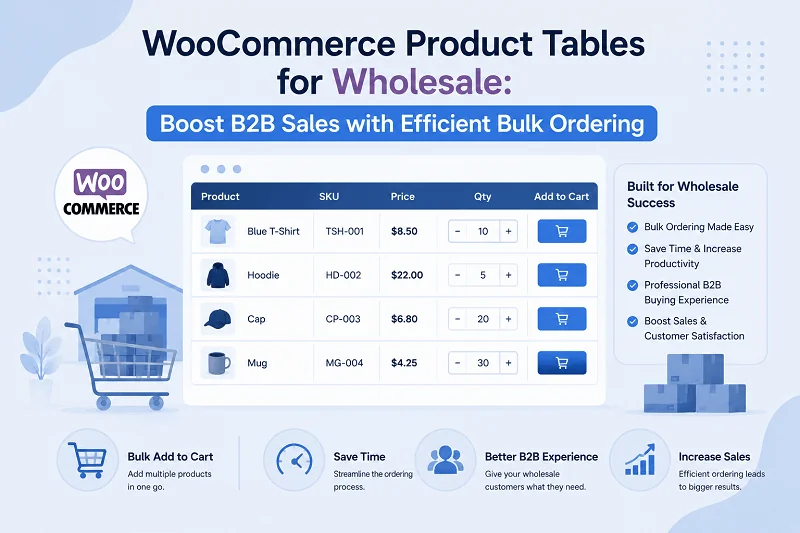
Think of it like this. Instead of showing products in a grid, you show them in a table. Like a spreadsheet. Except it’s interactive. You get columns. Product name. SKU. Price. Stock status. Whatever you want. Customers see everything at once. No opening individual pages. No hunting for information.
They need product details? The table shows them. They want to add ten items? A checkbox system lets them select multiple and bulk add everything. They need a quote? One form covers all selected items. The real magic happens with search and filters. Customer types “widget” in the search box. The table instantly filters showing only widgets. No page reload. No waiting. Just instant results as they type.
They want to filter by price? Click a dropdown. Filter by category? Click another. Add both filters? Table updates showing only items matching both criteria. Everything happens in real-time. That’s a WooCommerce product table. Fast. Organized. Built for how wholesale buyers actually shop.
The Real Problems This Solves
Let me walk through what actually improves when you implement this properly.
Customers Order Way Faster
A wholesale buyer who takes twenty minutes to order now takes five. That sounds minor. Multiply it by twenty orders per month. That’s five hours saved per customer per month. For a customer ordering weekly? That’s twenty hours saved annually. They notice. They appreciate it. They order more because the friction is gone.
You Get More Quote Requests
When customers can request a bulk quote in thirty seconds instead of emailing individual requests they just do it. More quotes means more conversations. More conversations means more sales. It’s that simple.
Your Team Processes Orders Faster
Bulk orders aren’t painful anymore. Customer adds fifty items at once. Your team receives one order to process instead of fifty individual add-to-cart actions. Processing time drops significantly.
Customers Actually Stay
Wholesale relationships are built on convenience. When you make ordering easy customers keep coming back. When they have to fight your system they leave. A WooCommerce product table signals that you understand their needs. That you’ve built your store for them.
Support Tickets Plummet
When customers can’t find products or don’t understand how to order they email support. A proper table system means they can figure things out themselves. Need to see all items in a category? Filter for it. Need to find something specific? Search instantly. No support ticket needed.
What a Real WooCommerce Product Table Includes
Not all product tables are equal. Here’s what actually matters.
AJAX Search That Actually Works
Customer types three letters and gets instant results. No waiting. No page reloads. Just typing and seeing results update in real-time. This is non-negotiable. If search is slow your system is broken.
Smart Filtering
Customers filter by category. Price. Attributes. Multiple filters at once. Table updates instantly. They can see exactly what matches their criteria. Not approximate matches. Exact matches.
Bulk Operations
Checkboxes let customers select multiple products at once. They set quantities. One button adds everything to cart. No selecting one product at a time. No repetitive clicking. Just checkbox everything and go.
Quote System
Customers select products and submit one quote form. All items get quoted together. You receive it in admin. Email notifications fire automatically. No manual email forwarding. No messy communication threads. Just organized quote management.
Customizable Display
Show exactly what information customers need. Product name. SKU. Price. Stock status. Custom fields. Whatever matters for your business. Hide everything else. Cluttered tables confuse people.
Role-Based Access
Different customers see different tables. Retail customers see retail pricing. Wholesale buyers see wholesale pricing. VIP customers see exclusive products. Everyone sees exactly what’s relevant to them.
Mobile Responsiveness
Customers order on phones. On tablets. On computers. The table works everywhere. Information is accessible regardless of device. This isn’t optional. Mobile is how people shop now.
How to Set This Up
Installation for the product table for WooCommerce is pretty straightforward. All you need to do is follow the steps below:
- Download your WooCommerce product table plugin. Upload to WordPress. Activate. You’re done with step one.
- Now you navigate to settings. WooCommerce > Settings > Product Tables. Click Add New Table.
- First you choose which products display. All products? Specific categories? Selected items only? You decide.
- Then you pick columns. Image. Name. SKU. Price. What else do you need? Drag and drop them in order. Rename labels to match your terminology.
- Next you enable features. AJAX search? Turn it on. Filters? Choose which ones. Bulk add to cart? Enable it. Quote requests? Toggle it.
- Configure appearance. Colors. Font sizes. Table style. Make it match your brand. Test on mobile. Make sure it looks right everywhere.
- Set permissions. Who sees this table? All customers? Logged in users only? Specific roles only?
Save. Place the shortcode on a page. Done. Your product table is now live. Customers immediately experience better ordering.
A Real Workflow From Start to Finish
Here’s how this actually works in practice.
Customer Arrives
They land on your wholesale page. Instead of a traditional grid they see a organized table. Fifty products visible at once. Images. Prices. SKUs. Stock levels. All right there.
They Search
They need ball bearings. They type “bearing” in search. The table instantly filters showing only bearing products. No waiting. No clicking through multiple pages. Just instant results.
They Filter Further
They only want bearings under twenty millimeters. They click a size filter. Table updates showing only small bearings. They also filter by price range. Table updates again. Now they see exactly what they need.
They Select Products
They need three different bearing types. They click checkboxes next to each one. They set quantities. Five of one type. Ten of another. Eight of the third.
They Checkout
One bulk add to cart button adds everything at once. No selecting one product at a time. No repetitive clicking. Just bulk action completing everything instantly.
They Get a Quote Instead
Maybe they want to request pricing first. No problem. They click the bulk quote button instead. One form opens. Collects their company info and notes. They submit. You receive a notification. They receive a confirmation. Everything is organized.
That workflow takes maybe two minutes total. On a traditional WooCommerce grid? Try twenty minutes. The difference is massive.
Solving Real Implementation Challenges
“We have hundreds of products. Won’t the table be slow?”
Pagination solves this. Show twenty products per page. Or fifty. Customers paginate or search to find what they need. Table stays fast.
“We already have custom product fields.”
Include them as columns. Whatever data you’re tracking becomes visible and searchable.
“We need different views for different customers.”
Create multiple tables. Different products. Different columns. Different pricing. Assign them by user role. Each customer segment sees exactly what’s relevant.
“We want to restrict pricing to logged-in customers.”
Set permissions. Role-based visibility means only authenticated wholesale customers see the table. Retail visitors see your regular shop.
“Our mobile customers are important.”
Mobile responsiveness is built-in. The table adapts to any screen size. Desktop browsers show full table. Mobile browsers show stacked view or scrollable columns. Either way customers can order.
Measuring What Actually Improves
After implementation watch for improvements.
Order processing time usually drops thirty to forty percent. Your team works faster because customers submit organized bulk orders instead of scattered individual purchases.
Quote requests typically increase because the barrier to entry drops. Customers submit more quotes when it takes thirty seconds instead of five minutes.
Customer retention improves. Wholesale buyers appreciate efficient ordering. They stick around. They order more frequently.
Support tickets decrease. When your system works customers don’t need help.
Reorder rate goes up. Customers return more frequently when ordering is painless.
Track these metrics. If they’re not improving troubleshoot. Most issues come from incomplete setup or staff not using the system.
Starting Your Implementation
Begin small. Create one WooCommerce product table for your best-selling category. Test it. Get feedback. Refine based on what customers actually need.
Then expand. Add more tables. More products. More filtering options. Train your team. Watch your wholesale operation transform.
A WooCommerce product table isn’t flashy. It won’t impress anyone with design. But it will make your business work better. It enables faster ordering. It increases quote requests. It improves customer retention.
Your wholesale customers will notice. They’ll appreciate the efficiency. They’ll order more. They’ll recommend you to other wholesale buyers. That matters more than anything else.